A presentation at the Peace Wapiti School Board meeting today on using social media to connect and build relationships. While the conversation was mainly twitter, we did touch on blogging, Facebook, geotagging photos and much more!
Make sure to give a follow our PWSD Trustee and Central Office Tweeps!
Stacey Pelland @StaceyPelland
Wendy Kelm @wendykelm
Richard Lappenbush @RLappenbush
Dana McIntosh @DanaMcIntosh
Kim Moodle @KimMoodie1
Sharilyn Anderson @pwsdsanderson
Christine Schlief @Christinepwsd
Sheldon Rowe @SheldonRowe
Brian Shields @JBrianShields
JoAnn Vanstone @JoAnnVan
Showing posts with label twitter. Show all posts
Showing posts with label twitter. Show all posts
Thursday, April 21, 2011

Tuesday, April 12, 2011
Intermediate Twits
A small group for Bright Ideas in Teaching with Technology (BITTs) today, but so long as there is one other person we will forge ahead.
Full Elluminate Recording
Previous BITTs
Please let me know what you would like to see in future sessions. The next BITT will be on Tuesday April 26th and the topic is video streaming!
Full Elluminate Recording
Previous BITTs
Please let me know what you would like to see in future sessions. The next BITT will be on Tuesday April 26th and the topic is video streaming!
Wednesday, April 6, 2011
Bright Ideas in Teaching with Technology

It’s time to revive the BITTs. Last year we had a number of BITTs, you can see the recordings here. Using elluminate from 3:45 – 4:30 there will be a brief introduction to a technology idea with classroom applications. The idea is to keep the sessions short, relevant and recorded so you can access them again later.
Tuesday April 12th – Intermediate Twitter (Tweetdeck, URL shortening, chats, lists)
Tuesday April 26th – Video Streaming (Learn 360, Discovery Education and Access Learning)
Tuesday May 3rd – To be determined (see below)
Please help me come up with new BITT topics by completing the following form.
To join an the elluminate session just click on the following link to access the elluminate room. It is best to have a mic and headset and feel free to pop into the room to check it out whenever you want. You will find additional information, resources and links on the PWSD Ed Tech Blog just prior to each session.
Sunday, February 27, 2011
Enabling Education Through Technology Symposium

Some of the things that I took away from this event:
1) Microsoft's Productivity and Future Vision
Is this what you see in the future? When, how far away are we? I know I leaned over to IT Darcy a number of times and asked him when I could get this in our classrooms!
2) Digital Citizenship: Tania Sterling (@taniasterling) was great. She shared this LiveBinder full of resources for digital citizenship in our schools. There were two ideas that I want to run with
- Family Acceptable Use Agreement - Parents and students all sign them, but do they really know what they mean? I want to make a serious effort in engaging our parents in this conversation and education.
- Students involved in PD - students may be our best resource as we navigate 21st century skills. It's time to enable and encourage them to become leaders. During upcoming PD sessions I would like to use students as facilitators.
- Google is in process of totally revamping Google Presentation, otherwise know as the ugly step child of Google Docs
- Their motto is "Don't be Evil" when they look at doing things
- 20% on innovation, that is the rule for all Google employees. Each week one days is spent on something that is not work, can you imagine?
- Will it stay free for education? Each mail box cost approximately $1 to create and maintain. Google charges business $50, keeping it free for education.

Sunday, February 20, 2011
Tweet, tweet with #pwsd
Wow! I was blown away with the amount of tweets at our district day on Friday. We had tweets from every session, from people at home and from central office. Thanks to all of you for making the day such a success!
Thanks to Cisco systems for donating the 2 Flip cameras and the jacket that were used in the Twitter draw!
Right now I have 74 #pwsd tweeps in my twitter list, please follow and let me know if I missed anyone.
How did I pick the winners?
The first thing I did was create a Tweetdoc of all of the #pwsd tweets for the day. Once I had the document that had all our tweets I used a random number generator to pick the winners.
Now my #pwsd tweeps, I have something in the works, maybe another little twitter give away. So tweet away
 |
| @CiscoSystems |
Thanks to Cisco systems for donating the 2 Flip cameras and the jacket that were used in the Twitter draw!
Right now I have 74 #pwsd tweeps in my twitter list, please follow and let me know if I missed anyone.
How did I pick the winners?
The first thing I did was create a Tweetdoc of all of the #pwsd tweets for the day. Once I had the document that had all our tweets I used a random number generator to pick the winners.
 |
| Rob S from BHRS @hackerob |
 |
| Darren R from HRS @drob222 |
 |
| Barb B from TPS @gpwonderwoman |
- Websites to share?
- What went well in class?
- Need some help?
- Share some resources!
Cultivating a Digital Classroom (Part 3 of 3)
This group rocks!
Our three day cohort came to an end on Friday, here you can find Part 1 and Part 2.
Friday started out with a reconnection with our PLN. Revisiting Twitter, update your profile and tweet. Connect with professionally relevant Facebook pages and look into RSS again.
Our second activity was a Pecha Kucha. Usually this is 20 slides advancing every 20 seconds presentation. Since we were pressed for time, we used 10 slides advancing every 10 seconds around the topic "Teaching and Learning in the 21st Century"
All groups did a fabulous job with the very short amount of time that I allotted them! We then used a Moodle forum to reflect how we could use this technique in the classroom.
Before we broke for lunch each person was given some digital scavenger hunt clues. Such things as old technology, new technology, fun, jump, and the funniest thing you could find. The assignment was to go out and take pictures with what you had. Phone, iPod, camera or borrowed camera. When we got back from lunch we collaborated on this Google Presentation.
We experienced first hand the positives (I can add the pictures and you do the captions) and negatives (who deleted my slide!) of working on a collaborative document.
We also had to figure out how to get images off devices and re size and flip them for the presentation.
A short discussion on blogging and the day was over!
My intention was to end the day with this video
But all groups were far to busy trying to get all their last tweets in to be entered into the draw for the Flip Cameras :0
Thanks so much to my fabulous group. They were challenging and engaged, fun and a great colleagues to learn and reflect with.
 |
| Becky, Daniel, Terrina, Lyla, Stacey, Anna, Marion, Shawn, Natalie, Darcy, Sharolyn, Adair & Sarah |
Friday started out with a reconnection with our PLN. Revisiting Twitter, update your profile and tweet. Connect with professionally relevant Facebook pages and look into RSS again.
 |
| Anna and Marion's Pecha Kucha |
All groups did a fabulous job with the very short amount of time that I allotted them! We then used a Moodle forum to reflect how we could use this technique in the classroom.
 |
| The Savanna Ladies! |
Until lunch everyone had time to work on projects. Some worked in Moodle creating courses, other explored Web 2.0 tools or fought with Word trying to make forms work. Work was done and laughs were shared.
 |
| Adair, Becky, Daniel and Natalie working on their Google Preso! |
 |
| This group had the "best" scavenger hunt pictures, can you find them? |
We also had to figure out how to get images off devices and re size and flip them for the presentation.
A short discussion on blogging and the day was over!
My intention was to end the day with this video
But all groups were far to busy trying to get all their last tweets in to be entered into the draw for the Flip Cameras :0
Thanks so much to my fabulous group. They were challenging and engaged, fun and a great colleagues to learn and reflect with.
Wednesday, February 16, 2011
We were all a Twitter!
Thanks to the energetic group of teachers and support staff that joined the elluminate session today after school. I am looking forward to another beginner session and intermediate session in the near future.
Take a look at the presentation and recording link for the 45 minute session.
Take a look at the presentation and recording link for the 45 minute session.
Tuesday, February 15, 2011
Twitter to Connect
As most of you know I love Twitter. It is my go to source for PD, resources, reflection and help. So when I got this DM (direct message)
 I thought it was spam! So I asked...

Dean worked his magic to make the whole things come together, and he nicely explains how he did it here.


Turns out it was legit and the planning document for a birthday present for Alec Couros. @courosa
I joined Twitter in November 2007 but didn't do much with it until I heard Alec keynote in 2009 at the Distributed Learning Symposium and Moodle Moot. During those conferences I saw the power of the back channel. I started Twitter by following my family but it was Alec who helped open my eyes to the true power of twitter to connect with other educators to share and collaborate.
So, I recorded my small part, with help of my kids, and this was the final product.
Dean worked his magic to make the whole things come together, and he nicely explains how he did it here.
Sunday, February 6, 2011
All a Twitter

During the upcoming district day, February 18th, I want to try to leverage Twitter as a back channel for the numerous PD sessions we have going on. We all cannot be in every session, but by using Twitter to share what is going on we get a glimpse inside another session.
Come learn to Tweet! Wednesday Feb 16th from 3:45 - 4:30 in Elluminate <-- Click here to enter the virtual room, try it out!
Tweet! The day of the district day (Feb 18th) using #pwsd
Sweeten the Deal! Every PWSD staff that tweets on the district day will be entered in a draw for some fabulous prizes! (One is an HD Flip Camera)
What do you think? Take a look here http://ecommunity.pwsd76.ab.ca/course/view.php?id=497 for additional resources and a discussion forum!
Tuesday, November 30, 2010
Connected Educator
I had a short presentation at our monthly admin meeting this morning where I wanted to show the power of being a connected educator. An hour before I was to start I tweeted out:


2) Sign up for Twitter
3) Download Tweetdeck, it will make your Twitter experience so much better!
4) Find Friends and Hashtags to follow
Might I suggest: #pwsd #abed #edchat and #cpchat
And this list of fine PWSD educators

I have been tweeting for just over a year and know that Twitter is something that makes my job easier, more fulfilling and generally just makes me happy to connect with all these fabulous people. However trying to show that is sometimes difficult, but not today!!
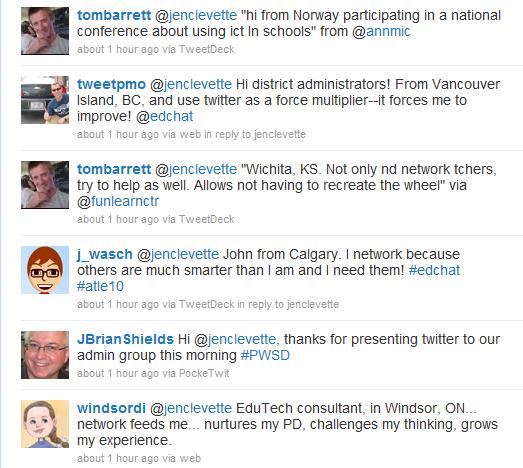


Thanks to my wonderful PLN I think we have a number of administrators that are convinced!
Here is some quick ways to get started:
1) Watch this...Twitter in 60 seconds
2) Sign up for Twitter
3) Download Tweetdeck, it will make your Twitter experience so much better!
4) Find Friends and Hashtags to follow
Might I suggest: #pwsd #abed #edchat and #cpchat
And this list of fine PWSD educators
 |
| cc licensed flickr photo shared by The Daring Librarian |
Monday, November 29, 2010
November Administrators Meeting
At this meeting we will be going over the Educational Technology in our district for this year. We will also start working on becoming Connected Principals.
Back Channel: either Tweet wtih #pwsd or join http://todaysmeet.com/novadmin
Back Channel: either Tweet wtih #pwsd or join http://todaysmeet.com/novadmin
Sunday, October 31, 2010
PWSD Twits

On Friday's district PD day the first thing the "Cultivating a Digital Classroom" session did was sign up for Twitter. Now twitter misbehaved a little and didn't get us all in as quickly as we wanted, but most of us tweeted and followed and got our feet wet.
PWSD Twits

Hashtag #pwsd
When you tweet about something to do with PWSD, make sure to add #pwsd. It will make it easy to search for tweets about PWSD and for those that are using Tweetdeck it will fall nicely into a column.
So what is going on in your classroom? Do you have something to share? A question that you want answered? Hope to see you twittering soon!
Thursday, September 9, 2010
#daily5 Conversation
I have mentioned before that Twitter is my go to source for resources, PD and connecting with other educators. So, when a group of teachers, including Harry Balfour's April Brown, were trying to organize a chat on the Daily 5, I offered up my virtual Elluminate office and volunteered to moderate the conversion. (This was purely for selfish reasons, I need to know more about the Daily 5 and I need more practice at moderation.)
 It was an amazing hour that just flew by. This group of teachers from around North America shared resources, experiences and offered tips and tricks on what worked and what did not. In the room we had educators that were just about to start the school year and never used Daily 5 before to experienced teachers who had been back to school for weeks.
Take a listen to the conversation and the links shared during the session
The PowerPoint that was shared was from The 2 Sisters website but you need to sign up, for free, to get a copy of it!
Interested in joining the #daily5 conversation?
1) Sign up for Twitter
2) Download Tweetdeck and watch this tutorial
3) Add #daily5 as one of your columns
The conversation continues daily on twitter and the date for the next virtual conversation will be discussed there. Thanks to all the lovely teachers in the room, I learned a lot and have some great new teachers to follow!

Take a listen to the conversation and the links shared during the session
The PowerPoint that was shared was from The 2 Sisters website but you need to sign up, for free, to get a copy of it!
Interested in joining the #daily5 conversation?
1) Sign up for Twitter
2) Download Tweetdeck and watch this tutorial
3) Add #daily5 as one of your columns
The conversation continues daily on twitter and the date for the next virtual conversation will be discussed there. Thanks to all the lovely teachers in the room, I learned a lot and have some great new teachers to follow!
Friday, June 25, 2010
Grade 2 Webpage


Subscribe to:
Posts (Atom)