It has been another fabulous year. Here is the report presented to the Tech Committee
The best part of the Ed Tech position is working with students and teachers. This year I was able to visit, sometimes extended visits, with almost every school in our district. Here is a glimpse
Create your own video slideshow at animoto.com.
This year I also had some fabulous opportunities to travel, attend PD and put on various sessions. Some of the highlights: Sir Ken Robinson, Alberta Education Community of Practice, ATLE, Mighty Peace Teachers Convention, Peace 10 District Day, Digital Citizenship Symposium and many more.
Create your own video slideshow at animoto.com.
Showing posts with label pd. Show all posts
Showing posts with label pd. Show all posts
Monday, June 6, 2011


Friday, June 3, 2011
Jump Start your 2011/12 School Year
With some summer PD opportunities! Click through to see the complete descriptions.
23 Things: Independent Study (self paced)
 SMART in Social Studies (August 15th)
Moodle - Not as Scary as You Think (August 16th)
Better Together - Social Media Bootcamp (August 17th - morning)
 Blogging 101 (August 17th - afternoon)
Learning Coaches - Get a Jump Start on Your New Role (August 18th)
SMARTboard 101 (August 22nd)
 Want to Engage Your Students - There's an App for That (August 23rd)
Google for Educators (August 24th - morning)
 Web 2.0 - Create, Collaborate and Critically Think (August 24th - afternoon)
23 Things: Independent Study (self paced)

Moodle - Not as Scary as You Think (August 16th)
Better Together - Social Media Bootcamp (August 17th - morning)

Learning Coaches - Get a Jump Start on Your New Role (August 18th)
SMARTboard 101 (August 22nd)

Google for Educators (August 24th - morning)

Wednesday, June 1, 2011
Google Workshop for Educators
This was an awesome workshop! We went through so many different google tools and their possible applications in the classroom that it was mind blowing. You can find the entire workshop and resources here as well as my Google bookmarks.
Here are the top 5 that I want to share:
1) Google Advanced Search - you will never look at searching the same way again. The tiny button at the end of the google search window "Advanced Search" gives you all of these options!
 I love and will frequently use
2) Google Squared - a great way to organize information. You can add and delelte information from your square as well as export it to a spreadsheet to work on yourself.
 3) Adding and annotating a Drawing - I always thought adding arrows and text to a image in a Google Presentation or Document was a pain. This makes it super simple.
 4) Language - again right at the end of the google search box is language tools. An excellent way to translate anything!
Honourable Mentions
Here are the top 5 that I want to share:
1) Google Advanced Search - you will never look at searching the same way again. The tiny button at the end of the google search window "Advanced Search" gives you all of these options!

- Unwanted words - want the Taj Mahal but not in Vegas?
- File Type - only want PowerPoint, only get them!
- Usage rights - make sure you can get images or files you can legally use
2) Google Squared - a great way to organize information. You can add and delelte information from your square as well as export it to a spreadsheet to work on yourself.

- Insert -- Drawing
- Add Image -- by URL, so it must be somewhere online
- Add Text, arrows etc and then save and close to insert into your Google Doc

- A search
- Type in Text
- Translate a Webpage (Check out this page in Russian)
- Change your default language
- Google Image Swirl - nifty little image visualizer
- Google Body - you will need to install Google Chrome to see this 3D view of the human body
- Google Art Project - take a virtual tour of a museum
Honourable Mentions
- Let me Google that for you! - do you have that person that is always asking you a question that you can easily google the answer. You have to try this...see an example here!
- Google Search Story - I think this would make a fabulous assignment. What would a character in a story or historical figure google?
Saturday, May 21, 2011
Savanna's PD Day
I love going to Savanna. The teachers fabulous, the conversations challenging and they always feed me. Unfortunately I don't get out there nearly as often as I would like. At 143km from Grande Prairie, Savanna is number two on the list of our furthest away schools in Peace Wapiti School Division.
 |
| Mike and Tina working hard! |
After polling the group.....
Monday, April 25, 2011
BITT: Video Streaming
What? Bright Ideas in Teaching with Technology Elluminate session
Where? Online, just click here
When? Tuesday April 26th, 3:45-4:30
Why? Zone 1 has purchased 3 video streaming sites, Learn 360, Discovery Education and Access Learning for at least 2011/2012 school year. Come find out some tips and tricks to use these more effectively.
What if I can't make it? Here is the recording link!!
Where? Online, just click here
When? Tuesday April 26th, 3:45-4:30
Why? Zone 1 has purchased 3 video streaming sites, Learn 360, Discovery Education and Access Learning for at least 2011/2012 school year. Come find out some tips and tricks to use these more effectively.
What if I can't make it? Here is the recording link!!
Sunday, March 13, 2011
MPTCA - My Sessions
All About Blogging - This was my first ever my double session. While I enjoyed having longer than 75 minutes, 3 hours was just too long!
We spent a good 2 hours establishing why teachers and students should blog, setting up an RSS reader

and subscribing to blogs. We then tried out three blogging platforms (Posterous, KidBlogs, Blogger) and then set up our own. No wonder everyone was exhausted! Feel free to check out the session here and play around with some of the blogging platforms. There are instructions, usernames and passwords to try each platform out.
 Technology Integration for Social Studies Div 3ish - This was my second double session and I think I had better pacing for this one! The best part of this session, my junior high social teacher Mr. Yas attended! My theme was Create, Collaborate and Critically Think. However with what was happening in Japan, we went a little off course (teachable moment) as I showed my #japan twitter stream, Al Jazeera English and The Boston Picture as alternative ways to get current events. The majority of the session you can find here. I think I started off strong with creating a fake Facebook page and different ways to use audio. We deviated slightly off course here and there, taking a looking at The Week in Rap and National Geographic Typical Person video. I think that teachers walked away with some new ideas and had a fair amount of time to play with them.
All in all a most excellent teachers' convention!
 |
| Who is that? And what is he eating? |

and subscribing to blogs. We then tried out three blogging platforms (Posterous, KidBlogs, Blogger) and then set up our own. No wonder everyone was exhausted! Feel free to check out the session here and play around with some of the blogging platforms. There are instructions, usernames and passwords to try each platform out.

All in all a most excellent teachers' convention!
What I learned at MPTCA
It was a good one! Managed to attend 8 of 8 sessions, although my stomach didn't appreciate it, my brain did!
Rick Wormeli (@rickwormeli) I attend his opening and closing keynotes. It was great way to start the conference with a few laughs and great reminders to take back to the classroom. Some things that I will take back from the opening session:
SMART Board in Humanities was next on my hit list, facilitated by twitter friend Vanessa Cassie. She was fabulous, as usual, and even though I had to skip out early she gave the group these two fabulous ideas:
Intro to Moodle was facilitated by Nicole Gilles and attended by all three Grande Prairie Districts! It will be so awesome to have a common language and to be able to easily share and collaborate. You can find all the session information here.
Rick Wormeli (@rickwormeli) I attend his opening and closing keynotes. It was great way to start the conference with a few laughs and great reminders to take back to the classroom. Some things that I will take back from the opening session:
Teachers do not play fair, students need to know the target to be able to hit it. Why are tests kept secret?
Deviating from the path, sometimes produces the best results.
Deviating from the path, sometimes produces the best results.
Because I said so = eat your spinach assignment!
And remember this about Rick...

During the closing keynote, who could forget the Sound of Music clip! What an awesome way to explain differentiation. Make sure that you follow Rick on Twitter and check out YouTube, he has tons of great clips, like this one.

During the closing keynote, who could forget the Sound of Music clip! What an awesome way to explain differentiation. Make sure that you follow Rick on Twitter and check out YouTube, he has tons of great clips, like this one.
 |
| Vanessa and the SMART session! |
- Hiding the text bubble in a political cartoon, allowing students to brainstorm what would be there and then erasing to reveal. I created my own here for those that are interested in trying it out and learning how to create their own.
- Using dice to create a story prompt. Using the image and text dice and have dice representing character, setting and object. Allow student to role to create their own writing prompt. Again you can see my example here to try out!
 |
| Nicole Moodling! |
What I loved about using Twitter, again, is that I have my notes from each session! See the #mptca twitter search here.
Sunday, March 6, 2011
What's Up? (March 7-11)

Here is what my week looks like:
Monday/Tuesday - Teepee Creek Technology Project days.
Tuesday evening - Peace Wapiti Academy Parent Council Presentation.
Wednesday - AM at PWA working with staff on their flexibility course. PM Networked Educational Leader session with Sandy McDonald
Thursday - All About Blogging 12:10-3pm in the PWA Computer lab.
Friday - Intro to Moodle 9-10:15 with Nicole Gilles in CP 85, I will be the trusty assistant. Technology Integration in Social Studies Div 3 10:35-1:25 in the PWA Computer lab.
Some items to check out....
- Mighty Peace Teachers' Convention program looks fabulous, do you know what you are going to?
- Technology Integration Matrix - where do you fit, where do you want to be?
- Take a minute and comment on the PWSD Community of Practice teacher Blog.
- How could you use this video?
Have a fabulous week and I hope to see everyone Thursday or Friday at Teachers' Convention!
I totally stole this idea from George Couros and his staffroom blog.
Sunday, February 27, 2011
Enabling Education Through Technology Symposium

Some of the things that I took away from this event:
1) Microsoft's Productivity and Future Vision
Is this what you see in the future? When, how far away are we? I know I leaned over to IT Darcy a number of times and asked him when I could get this in our classrooms!
2) Digital Citizenship: Tania Sterling (@taniasterling) was great. She shared this LiveBinder full of resources for digital citizenship in our schools. There were two ideas that I want to run with
- Family Acceptable Use Agreement - Parents and students all sign them, but do they really know what they mean? I want to make a serious effort in engaging our parents in this conversation and education.
- Students involved in PD - students may be our best resource as we navigate 21st century skills. It's time to enable and encourage them to become leaders. During upcoming PD sessions I would like to use students as facilitators.
- Google is in process of totally revamping Google Presentation, otherwise know as the ugly step child of Google Docs
- Their motto is "Don't be Evil" when they look at doing things
- 20% on innovation, that is the rule for all Google employees. Each week one days is spent on something that is not work, can you imagine?
- Will it stay free for education? Each mail box cost approximately $1 to create and maintain. Google charges business $50, keeping it free for education.

Sunday, February 20, 2011
Cultivating a Digital Classroom (Part 3 of 3)
This group rocks!
Our three day cohort came to an end on Friday, here you can find Part 1 and Part 2.
Friday started out with a reconnection with our PLN. Revisiting Twitter, update your profile and tweet. Connect with professionally relevant Facebook pages and look into RSS again.
Our second activity was a Pecha Kucha. Usually this is 20 slides advancing every 20 seconds presentation. Since we were pressed for time, we used 10 slides advancing every 10 seconds around the topic "Teaching and Learning in the 21st Century"
All groups did a fabulous job with the very short amount of time that I allotted them! We then used a Moodle forum to reflect how we could use this technique in the classroom.
Before we broke for lunch each person was given some digital scavenger hunt clues. Such things as old technology, new technology, fun, jump, and the funniest thing you could find. The assignment was to go out and take pictures with what you had. Phone, iPod, camera or borrowed camera. When we got back from lunch we collaborated on this Google Presentation.
We experienced first hand the positives (I can add the pictures and you do the captions) and negatives (who deleted my slide!) of working on a collaborative document.
We also had to figure out how to get images off devices and re size and flip them for the presentation.
A short discussion on blogging and the day was over!
My intention was to end the day with this video
But all groups were far to busy trying to get all their last tweets in to be entered into the draw for the Flip Cameras :0
Thanks so much to my fabulous group. They were challenging and engaged, fun and a great colleagues to learn and reflect with.
 |
| Becky, Daniel, Terrina, Lyla, Stacey, Anna, Marion, Shawn, Natalie, Darcy, Sharolyn, Adair & Sarah |
Friday started out with a reconnection with our PLN. Revisiting Twitter, update your profile and tweet. Connect with professionally relevant Facebook pages and look into RSS again.
 |
| Anna and Marion's Pecha Kucha |
All groups did a fabulous job with the very short amount of time that I allotted them! We then used a Moodle forum to reflect how we could use this technique in the classroom.
 |
| The Savanna Ladies! |
Until lunch everyone had time to work on projects. Some worked in Moodle creating courses, other explored Web 2.0 tools or fought with Word trying to make forms work. Work was done and laughs were shared.
 |
| Adair, Becky, Daniel and Natalie working on their Google Preso! |
 |
| This group had the "best" scavenger hunt pictures, can you find them? |
We also had to figure out how to get images off devices and re size and flip them for the presentation.
A short discussion on blogging and the day was over!
My intention was to end the day with this video
But all groups were far to busy trying to get all their last tweets in to be entered into the draw for the Flip Cameras :0
Thanks so much to my fabulous group. They were challenging and engaged, fun and a great colleagues to learn and reflect with.
Wednesday, February 16, 2011
We were all a Twitter!
Thanks to the energetic group of teachers and support staff that joined the elluminate session today after school. I am looking forward to another beginner session and intermediate session in the near future.
Take a look at the presentation and recording link for the 45 minute session.
Take a look at the presentation and recording link for the 45 minute session.
Sunday, February 6, 2011
All a Twitter

During the upcoming district day, February 18th, I want to try to leverage Twitter as a back channel for the numerous PD sessions we have going on. We all cannot be in every session, but by using Twitter to share what is going on we get a glimpse inside another session.
Come learn to Tweet! Wednesday Feb 16th from 3:45 - 4:30 in Elluminate <-- Click here to enter the virtual room, try it out!
Tweet! The day of the district day (Feb 18th) using #pwsd
Sweeten the Deal! Every PWSD staff that tweets on the district day will be entered in a draw for some fabulous prizes! (One is an HD Flip Camera)
What do you think? Take a look here http://ecommunity.pwsd76.ab.ca/course/view.php?id=497 for additional resources and a discussion forum!
Thursday, February 3, 2011
Introducing PWSD's Community of Practice

From September 2006 until August 2010 Alberta Education ran a research project around 1-1 laptops. When this research project ended Alberta Education had another call for proposals to create a Community of Practice to extend the 1-1 project. Peace Wapiti is practicipating in this project with Division 3 teachers around 21st Century Skill development. You can see the entire proposal here.

Please drop by the blog and see what we have been up to!
Monday, November 29, 2010
5 Things I Learned at #atle10
1) It's about relationships! I met so many people in real life for the first time. They were just as open, genuine, caring, willing to listen and share as they are in the virtual world. So many new friend were made too, some of even connected to find out we live just down the road from one another. And it is always nice to spend time face to face with the Northern Tech Group. Significant steps forward we made in creating a provincial Moodle sharing spot. It was about the people!

2) iPods are for entertainment and education. I attended an awesome session about Chinook's Edge iPod project. Terry-Ann Robertson is so excited about the project and the changes she has seen in her school that you can't help but be excited along with her. I tried to get all the apps she mentioned down, but she was flying, and promised us a website in the near future. I am wondering if I can swing down for a visit, I would love to see their project in action.
3) Google Apps or Live @ Edu ? Does it matter? There was lots of sharing about what these cloud computing tools can do for students! For students! These tools hold the potential for students to have the anytime, anywhere, anyplace access that is needed.
4) Twitter was fast and furious and I think we have a few converts. Every session I was in had someone helping show twitter or tweetdeck or hashtags. Lots of covert looking at name tags, happy introductions and trying to figure out who actually looks like their avatar. We even had a few twitter stalking moments as people finally met up for the first time.
5) I love elluminate! I got to help moderate the elluminate sessions and learn from the master himself Pat Bohnet.
 For each session our virtual room filled and the back channel was awesome. What was not so awesome is the 3 second delay that I listened to, but with the recordings here I get to back and review them again and again.
It was an awesome 3 days and I can't wait until next year!

2) iPods are for entertainment and education. I attended an awesome session about Chinook's Edge iPod project. Terry-Ann Robertson is so excited about the project and the changes she has seen in her school that you can't help but be excited along with her. I tried to get all the apps she mentioned down, but she was flying, and promised us a website in the near future. I am wondering if I can swing down for a visit, I would love to see their project in action.
3) Google Apps or Live @ Edu ? Does it matter? There was lots of sharing about what these cloud computing tools can do for students! For students! These tools hold the potential for students to have the anytime, anywhere, anyplace access that is needed.
4) Twitter was fast and furious and I think we have a few converts. Every session I was in had someone helping show twitter or tweetdeck or hashtags. Lots of covert looking at name tags, happy introductions and trying to figure out who actually looks like their avatar. We even had a few twitter stalking moments as people finally met up for the first time.
5) I love elluminate! I got to help moderate the elluminate sessions and learn from the master himself Pat Bohnet.

It was an awesome 3 days and I can't wait until next year!
Monday, November 1, 2010
Cultivating a Digital Classroom (Day 2 of 3)
 |
| The whole gang. |
We started the day by signing up for Twitter. I just finished posting on the PWSD twits below.
 |
| Team PWA |
After a little inspirational video, we shared what we had been doing in our classrooms in the two months since we had last met. In August when we met we spent the session working on creating) There were some amazing stories shared about what worked and what didn't work. PWA teachers shared students were using what they learned in their classrooms, Prezi and Glogster, and were transferring that to other classes and their personal life. Bezanson shared this fabulous website, A Story Before Bedtime, that they highlighted to parents at the literacy parent's night. And there were a few that just could not hide their love for Moodle! There were also some challenges shared. Quite a few teachers have created Facebook groups for their classes but students are just not joining. Technology had failed at times, files were lost or computer labs were full. However, the good definitely outweighed the bad.
 |
| Team Bezanson |
 |
| Team Sexsmith |
Another video, Changing Education Paradigms and short discussion before we set to work on designing some technology projects for the upcoming weeks.
After lunch we launched into using Outlook to subscribe to RSS. Since my voice was going and the technology failed me slightly, I created the video below to add some clarity to what I was trying to demonstrate. (This is 2nd only to Twitter in my personal technology toolkit)
Thanks to all the teachers that participated, they day could not have happened without you. Looking forward to our next meeting in January!
Monday, October 11, 2010
Peace River PD Day
On September 27th five Peace Wapiti teachers made the trek to Peace River to present at their professional development day. Debbie Harris (HRS), Memorese Walter (HBS), Shelley Freisen (PAVE), Joan Coy (PAVE) and myself presented on a variety of topics.
The day started with a 10 minute keynote, over Elluminate, from the Honourable Minster of Education Dave Hancock.
Here is a list of sessions and the accompanying documents.
Using Gallery items in SMART Notebook for Div 3 Science
Debbie Harris
You will be shown examples of how the Gallery items in SMART Notebook can be used to create interactive science lessons. You will have an opportunity to create some interactive lessons that you can use in class the next day, so come prepared to get lots done that you can take away with you. BRING A MEMORY STICK!!
Interactive Resources for Teaching Science using a SMARTBoard
Debbie Harris
If you are new to using a SMART Board and want to find some ready-made interactive resources for science this is the session for you! You will have the chance to explore websites such as LearnAlberta.ca and 2Learn.ca to find science resources that you can use in class the next day. BRING A MEMORY STICK TO SAVE WORK!
Let's Moodle in Science 9-12
Joan Coy
Using a blend of technology-rich on-line learning resources with traditional classroom teaching environments, we can improve the school experience and engage students in self directed learning. Teachers in our large rural division have created a Moodle site that hosts our Science courses and gives students access to high quality on-line courses on their Moodle site (24/7), in addition to classroom instruction. The Moodle site is being used to facilitate differentiation and inquiry learning (i.e. self-checks, self reflections, and project collaboration). Each teacher has their own way of doing this (that's the beauty of Moodle.) Come and see how the classroom has changed!
Advanced Moodle k-12
Joan Coy
This session is designed to extend and enhance the skills of a Moodle course creator. It includes a brief consideration of the pedagogy – Social Constructivism and how Moodle Activities are designed to support this social and interactive philosophy. It will also examine effective strategies for Resources & Blocks – how to provide information to students. The session will show participants, in a hands-on environment, how to use the relevant components of Moodle to support the learning needs of students. You will be able make creative progress in your Moodle course
Introduction to Moodle k-12
Jen Clevette
Whether you have never moodled before or you want a refresher on the basics and time to work, this is the place for you. We will be covering some moodle basics like linking WebPages & files, embedding video, adding topics & pictures, glossaries & games and assignment basics. You must have a moodle course created to attend this session
SMART in JH Social Studies
Jen Clevette
What works and where can I find it? Pre-made materials for the new curriculum are hard to come by, so let's start making our own. We will go over some lesson basics, like title pages & themes, identify the interactives from the Lesson Activity Toolkit that work best and play with some Web 2.0 tools that will add some pizazz to your lessons. Put it all together and we will have lessons to share.
All lessons created will be added to this collaborative website http://tiny.cc/div3SS
Senior High English - Bring them in and start them off!
Shelly Friesen
This session will share some resources that high school English teachers can use for ‘Daily Starters’. Using your SMARTboard, you can establish structure, fill that change-of-class time and get your students thinking about the English language. There will be time to explore, share and collaborate.
Senior High English: How can I use technology to help me?
Shelly Friesen
Teach SMARTer using teacher tools on the web and in your classroom. In this afternoon session we will investigate how to use SMARTboards to help your students learn and help you professionally. In the first few minutes you will help to build the agenda and content direction for the afternoon.
“Playing” with your SmartBoard K/1
Memorese Walters
Non- and beginning readers have special learning requirements that your SmartBoard can help provide. This session will leave you with lots of curriculum links and content that you can take back to your classroom and use immediately to meet their unique needs
2/3 SmartBoards – Curriculum First!
Memorese Walters
Want to know how to better incorporate your SmartBoard into your classroom instruction? This session will provide you with lots of curriculum links and content that you can take back to your classroom and use immediately. LA, Math, Science, and Social activities including pulling it all together on a daily basis and a little extra with the document camera's amazing abilities!
The day started with a 10 minute keynote, over Elluminate, from the Honourable Minster of Education Dave Hancock.
 |
| Elluminate with Minister Hancock |
Here is a list of sessions and the accompanying documents.
Using Gallery items in SMART Notebook for Div 3 Science
 |
| Deb's Science folks |
You will be shown examples of how the Gallery items in SMART Notebook can be used to create interactive science lessons. You will have an opportunity to create some interactive lessons that you can use in class the next day, so come prepared to get lots done that you can take away with you. BRING A MEMORY STICK!!
Interactive Resources for Teaching Science using a SMARTBoard
Debbie Harris
If you are new to using a SMART Board and want to find some ready-made interactive resources for science this is the session for you! You will have the chance to explore websites such as LearnAlberta.ca and 2Learn.ca to find science resources that you can use in class the next day. BRING A MEMORY STICK TO SAVE WORK!
Let's Moodle in Science 9-12
Joan Coy
Using a blend of technology-rich on-line learning resources with traditional classroom teaching environments, we can improve the school experience and engage students in self directed learning. Teachers in our large rural division have created a Moodle site that hosts our Science courses and gives students access to high quality on-line courses on their Moodle site (24/7), in addition to classroom instruction. The Moodle site is being used to facilitate differentiation and inquiry learning (i.e. self-checks, self reflections, and project collaboration). Each teacher has their own way of doing this (that's the beauty of Moodle.) Come and see how the classroom has changed!
Advanced Moodle k-12
Joan Coy
This session is designed to extend and enhance the skills of a Moodle course creator. It includes a brief consideration of the pedagogy – Social Constructivism and how Moodle Activities are designed to support this social and interactive philosophy. It will also examine effective strategies for Resources & Blocks – how to provide information to students. The session will show participants, in a hands-on environment, how to use the relevant components of Moodle to support the learning needs of students. You will be able make creative progress in your Moodle course
Introduction to Moodle k-12
 |
| Intro to Moodle group |
Whether you have never moodled before or you want a refresher on the basics and time to work, this is the place for you. We will be covering some moodle basics like linking WebPages & files, embedding video, adding topics & pictures, glossaries & games and assignment basics. You must have a moodle course created to attend this session
SMART in JH Social Studies
Jen Clevette
 |
| Social Studies & SMART |
All lessons created will be added to this collaborative website http://tiny.cc/div3SS
Senior High English - Bring them in and start them off!
Shelly Friesen
This session will share some resources that high school English teachers can use for ‘Daily Starters’. Using your SMARTboard, you can establish structure, fill that change-of-class time and get your students thinking about the English language. There will be time to explore, share and collaborate.
Senior High English: How can I use technology to help me?
Shelly Friesen
Teach SMARTer using teacher tools on the web and in your classroom. In this afternoon session we will investigate how to use SMARTboards to help your students learn and help you professionally. In the first few minutes you will help to build the agenda and content direction for the afternoon.
“Playing” with your SmartBoard K/1
Memorese Walters
 |
| Mem's SMART session |
2/3 SmartBoards – Curriculum First!
Memorese Walters
Want to know how to better incorporate your SmartBoard into your classroom instruction? This session will provide you with lots of curriculum links and content that you can take back to your classroom and use immediately. LA, Math, Science, and Social activities including pulling it all together on a daily basis and a little extra with the document camera's amazing abilities!
Monday, August 30, 2010
Cultivating a Digital Classroom (Part 1 of 3)
Cultivating a Digital Classroom is the topic that Debbie Harris and myself will be facilitating at the 3 professional development district days.


 |
| Debbie modelling how to use Prezi and talking about different ways to communicate with parents and students. |
The group that I had was lovely. We quickly watched a few videos, made avatars and got ourselves set up in Moodle.
For the afternoon, I introduced my top 10 tech tools and the remainder of the day was spent creating something to be used during the first week of school. While wallwisher failed a few times on us, Prezi and Photopeach were heard around the room.

We left with a commitment to share in October something we did in our classrooms that we learned today. We also decided in October we want to explore social media and opportunities to connect outside our classroom using Facebook, Twitter and Blogs.
And then left on a happy note....
Smartboard Tips from SRRA
Spent a lovely Friday afternoon at Spirit River Regional Academy where we divided the day learning about Moodle and Smartboards.


Top 5 Tips for Using your SMARTboard
- Gallery Interactives - make any lesson interactive, QUICKLY & EASILY, with the lesson activity toolkit. My favourites: vortex, category sort, multiple choice

2. Print to Notebook - turn any file into a notebook file. Just open your Word, PowerPoint or PDF and select Print --> SmartNotebook Capture.
3. Borrow ready to use Notebook Files - there are lots of resources out there, find something to start from and modify it to
- PWSD's Smart warehouse
- Jen's Delicious SMART bookmarks
4. Link to website or files (make your lesson clickable, no searching!)

5. Install Notebook at home! You will need to use your PWSD user name and password.
You can find a printable version of these 5 tips here.
While exploring the SMART Exchange we found a morning calender that everyone liked and wanted to use.
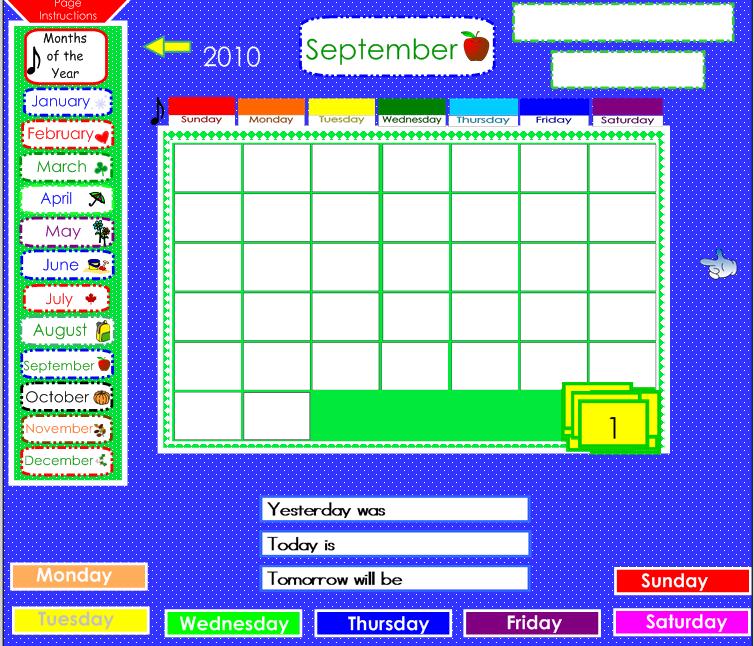
I have modified it to have Canadian icons and it is available for download here.
Thanks for a wonderful day! Can't wait to come back!
Wednesday, August 25, 2010
New Teacher Ed Tech Orientation
I had the privilege to spend an hour and a half with new (or at least new to PWSD's September) teachers to our district. The time went by way too fast and these lovely ladies and gentlemen are going to keep me on my toes this year.

We did a basic overview of PWSD's systems using this short Prezi.
Some of the WOW, I need to remember this items included:

We did a basic overview of PWSD's systems using this short Prezi.
Some of the WOW, I need to remember this items included:
- Sharepoint : once you are logged in at home you have access to your My Documents! No more emailing back and forth or putting things on memory sticks.
- Resources : if you need some one stop shopping for resources remember that Collaboration has resources for subject & div level as well as Education Technology resources. You also have access to all my public bookmarks, just use the navigation on the right side to narrow down what you are looking for.
- E-Community : with over 700 courses created there is lots here to borrow! Browse through other courses and if something jumps out as useful to you, drop me an email and we can move that over to your course page. We did get a chance to work a bit in ecommunity, where almost everyone added a title, link to a website and embedded a video. There are lots of Moodle how-tos here.
Darcy come in from IT to answer all the tough questions
- Internet filters : yes we have then, they are a site based decision so talk to your administrator
- Server space: teachers have a soft 5 GB limit
- Network access forms : need to be submitted before you can do anything on a PWSD system!

So fast and furious but hopefully a little bit fun!
Subscribe to:
Posts (Atom)