The last in our AISI Literacy series this year that takes a look inside a classroom in Peace Wapiti School Division.
Special thanks to Mem, Collette and Donna for sharing their wonderful classrooms with us! And to Rowena for making sure this good work gets done and published!
Showing posts with label literacy. Show all posts
Showing posts with label literacy. Show all posts
Saturday, May 21, 2011

Tuesday, March 15, 2011
Writing Prompts and Moodle Forums
The last couple of weeks I have spent time at Teepee Creek school working with their Grade 5/6 Language Arts teacher. We knew we wanted to do a writing assignment, that students could see each others work and reflect on it.
We picked 3 websites to use as writing prompts.
For each of the writing prompts we created a forum.

 This was a great way for students to start sharing their work, reflect and respond to others in a password protected environment. Next up...blogging!
We picked 3 websites to use as writing prompts.
For each of the writing prompts we created a forum.
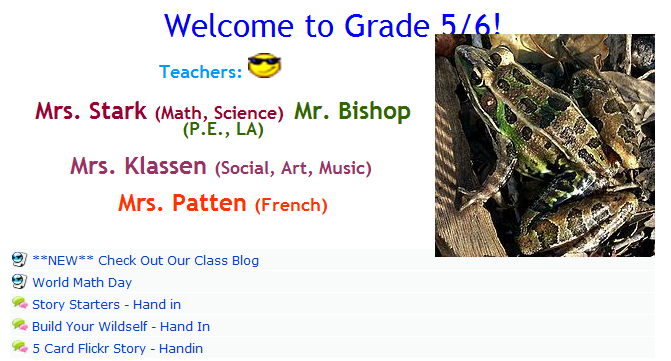
Inside each forum was a simple set of instruction for how to get to the writing prompt, how to hand in the assignment and some feedback prompts.

Monday, March 7, 2011
Mystery Podcasts
 |
| Adding music. |
1) Podcasting Moodle Page - had all students start here, that way they have a list of resources, how tos and audio files, to refer back to. As well I have linked the Audacity download if students wanted to use this at home.
2) Quick Demo - I did a quick demo of recording, saving and importing audio from a website, deleting and moving audio clips around.
 |
| Reading from a script, |
 |
| Reading from typed script |
Then we set them loose. Look at some of their creations!
Sunday, March 6, 2011
Using a Pensieve in a Junior High Literacy Classroom
This is the second in a series looking inside a balanced literacy junior high classroom. Part 1, on Word Work, can be found here. In these videos Jenny will explain how she uses a pensieve for herself, her students and for assessment. You can find the complete video on YouTube here.
Special thanks to literacy coordinators Jenny McAusland and Rowena Stewart for spearheading this project!
Special thanks to literacy coordinators Jenny McAusland and Rowena Stewart for spearheading this project!
Sunday, February 27, 2011
Word Work in a Balanced Literacy Jr. High Classroom
This is a first in a series taking a look inside a balanced literacy junior high classroom.
Special thanks to literacy coordinators Jenny McAusland and Rowena Stewart for spearheading this project.!
Special thanks to literacy coordinators Jenny McAusland and Rowena Stewart for spearheading this project.!
Tuesday, December 14, 2010
Literacy: Digital Ways to encourage Writing
Here is a couple of websites that I have seen used successfully this year to motivate and encourage students to write.
I think what has been key this year is giving students an authentic audience to write for. When you can put your ideas and thoughts out on the Internet and have other people, sometimes strangers, comment on what you did...the feeling is unbelievable!

Click here for links and details http://sqworl.com/mmwk3r
Thanks to Shelley Friesen for showing me Sqworl, the cool visual bookmarking tool! Let us know if there is anything we can do to help!
I think what has been key this year is giving students an authentic audience to write for. When you can put your ideas and thoughts out on the Internet and have other people, sometimes strangers, comment on what you did...the feeling is unbelievable!

Click here for links and details http://sqworl.com/mmwk3r
Thanks to Shelley Friesen for showing me Sqworl, the cool visual bookmarking tool! Let us know if there is anything we can do to help!
Wednesday, December 8, 2010
Writing Prompts: 5 Card Flickr
I got this wonderful idea from this presentation, which is part of the Interesting Ways series.


How To
(1) Go to 5 Card Flickr website and start choosing the images that you will write from. Each time you pick an image the page will refresh with different images.
(2) When you have 5 images selected you will get a dialogue box to type in the title of your story, your name and the story.
(3) Once you have submitted, and your story is now published on the web, you are given the URL of the story.
(4) We then had students add their URL to a forum in Moodle so that they could visit each others stories and add comments!
Comments and Concerns
- Make sure students use their first name only for publishing
- Students were initially concerned about online publishing but ended up loving that other people could read their stories
- Writing for a "real" audience changes how you write, right?
- Have fun!
Monday, November 29, 2010
Digital Storytelling: A Day
For a recent school assignment I had to create a digital story. Being some what creatively challenged I told the story of a day in the life of my job as Educational Technology Coordinator for Peace Wapiti School District. Wanting a bit of a challenged I set out to create the story completely on my iPhone. Here are 3 different versions.
This first story was created using a free application called StoryKit. You can find the story here. What I liked about this application is that I could use capture multiple voices for my story. I could also crop the images right on my phone.
The second story was created using StoryRobe, another free app. What I liked about this is how it rendered as a YouTube video.
The final story was created using PhotoPeach which is a free web application. It is crazy simple to use.
PWSD Educational Technology on PhotoPeach
For a more complete analysis please visit my other blog.
This first story was created using a free application called StoryKit. You can find the story here. What I liked about this application is that I could use capture multiple voices for my story. I could also crop the images right on my phone.
The second story was created using StoryRobe, another free app. What I liked about this is how it rendered as a YouTube video.
The final story was created using PhotoPeach which is a free web application. It is crazy simple to use.
PWSD Educational Technology on PhotoPeach
For a more complete analysis please visit my other blog.
A Story Before Bedtime

Guest Blogger: Terry Hildebrand, Bezanson School
The web site is called AStoryBeforeBed.com. It is a site with many on line books for ages 1-9. You can record the books orally and with a web cam there is a picture of you reading the book. There are some free books to practice on to just try the site out. You can purchase a classroom licence for $99 and a school licence for $499.00. This give you the ability to record about 29 books unlimited number of times. Lots of classics and old stories that children love. They add to the site often.
Here is an example of Xavier and the Wind:

How we are using it:
1. I first found this site as a free app for my I-Pad under educational sites. It allows me to read books for my grandsons and then e-mail the books to them and they can hear and watch Gramma read them a story before bed.
2. We presented the site to parents at our literacy night as a place they might like to take their children to read a story on line and send it to grandparents, uncles, aunts - etc.
We had a few students demonstrate the recording of a book. You can practice it several times before actually submitting it. Once it is submittted it is your book you can send it to multiple people.
3. We are using it now in our school to have students read stories, record themselves reading and then send them to family or fellow students. For the younger students we received e-mail addresses from their parents so they have control over who the stories are sent to.
Monday, October 11, 2010
#daily5 October Chat
This group of educators continues to amaze me. Organized on twitter, using the #daily5 hashtag this group got together for another informal conversation. They shared successes, asked and answered questions, supported each other and then made plans to do it again in November! An awesome example of how sharing and collaboration.
Here is the link to the session recording.
And on holiday Monday no less!

Here is the link to the session recording.
And on holiday Monday no less!

Tuesday, September 28, 2010
Listening to Reading

One of the areas of focus, as I understand it, is listening to reading. As we were sitting disussing how the year was going, the comment was that it was difficult to find audio books. This is where I have ideas!
Listening to Reading!
1) Free Websites to download audiobooks
- Lit2Go each book as a MP3, text of web and a downloadable Mp3
- Children's Stories: Free Audio Books each book as online text, online audio or downloadable Mp3
- Books Should be Free allows you search by genre and then download as MP3
- E-Books from Project Gutenberg download in formats for iPod, iPad and Kindle
***Once download you could burn them to CD or load them on an iPod for listening
2) Create your own audiobooks
- Buy a mic or headset
- Lots of great tutorials on YouTube or PWSD's Podcasting course
Have fun and let me know if you are willing to share!
Thursday, September 9, 2010
#daily5 Conversation
I have mentioned before that Twitter is my go to source for resources, PD and connecting with other educators. So, when a group of teachers, including Harry Balfour's April Brown, were trying to organize a chat on the Daily 5, I offered up my virtual Elluminate office and volunteered to moderate the conversion. (This was purely for selfish reasons, I need to know more about the Daily 5 and I need more practice at moderation.)
 It was an amazing hour that just flew by. This group of teachers from around North America shared resources, experiences and offered tips and tricks on what worked and what did not. In the room we had educators that were just about to start the school year and never used Daily 5 before to experienced teachers who had been back to school for weeks.
Take a listen to the conversation and the links shared during the session
The PowerPoint that was shared was from The 2 Sisters website but you need to sign up, for free, to get a copy of it!
Interested in joining the #daily5 conversation?
1) Sign up for Twitter
2) Download Tweetdeck and watch this tutorial
3) Add #daily5 as one of your columns
The conversation continues daily on twitter and the date for the next virtual conversation will be discussed there. Thanks to all the lovely teachers in the room, I learned a lot and have some great new teachers to follow!

Take a listen to the conversation and the links shared during the session
The PowerPoint that was shared was from The 2 Sisters website but you need to sign up, for free, to get a copy of it!
Interested in joining the #daily5 conversation?
1) Sign up for Twitter
2) Download Tweetdeck and watch this tutorial
3) Add #daily5 as one of your columns
The conversation continues daily on twitter and the date for the next virtual conversation will be discussed there. Thanks to all the lovely teachers in the room, I learned a lot and have some great new teachers to follow!
Subscribe to:
Posts (Atom)