Here is a couple of websites that I have seen used successfully this year to motivate and encourage students to write.
I think what has been key this year is giving students an authentic audience to write for. When you can put your ideas and thoughts out on the Internet and have other people, sometimes strangers, comment on what you did...the feeling is unbelievable!
Click here for links and details http://sqworl.com/mmwk3r
Thanks to Shelley Friesen for showing me Sqworl, the cool visual bookmarking tool! Let us know if there is anything we can do to help!
Tuesday, December 14, 2010
12 days of Educational Technology
On the twelfth day of Christmas my Ed Tech shared with me
Twelve must have items,
Eleven parts of Google,
Ten Video Options,
Nine Ways to Wiki,
Eight Keys to twitter,
Seven Presentation Tools
Six Cartoon Generators
Five Avatar Creators
Four Word Clouds
Three Blogging Tools
Two Sticky Walls
One Creative Commons Search
Please check out the full course http://ecommunity.pwsd76.ab.ca/course/view.php?id=947 (there is a moodle zip if you wish to deploy it in your own moodle)
Wednesday, December 8, 2010
IT/ET Board Meeting Presentation
Some of the files, slideshows, links and videos that we hope to use during the 40 minute presentation.
IT Darcy's handout
Peace Wapiti School Division Facebook Page
PWSD Educational Technology on PhotoPeach
IT Darcy's handout
Peace Wapiti School Division Facebook Page
PWSD Educational Technology on PhotoPeach
Writing Prompts: 5 Card Flickr
I got this wonderful idea from this presentation, which is part of the Interesting Ways series.


How To
(1) Go to 5 Card Flickr website and start choosing the images that you will write from. Each time you pick an image the page will refresh with different images.
(2) When you have 5 images selected you will get a dialogue box to type in the title of your story, your name and the story.
(3) Once you have submitted, and your story is now published on the web, you are given the URL of the story.
(4) We then had students add their URL to a forum in Moodle so that they could visit each others stories and add comments!
Comments and Concerns
- Make sure students use their first name only for publishing
- Students were initially concerned about online publishing but ended up loving that other people could read their stories
- Writing for a "real" audience changes how you write, right?
- Have fun!
Tuesday, November 30, 2010
Connected Educator
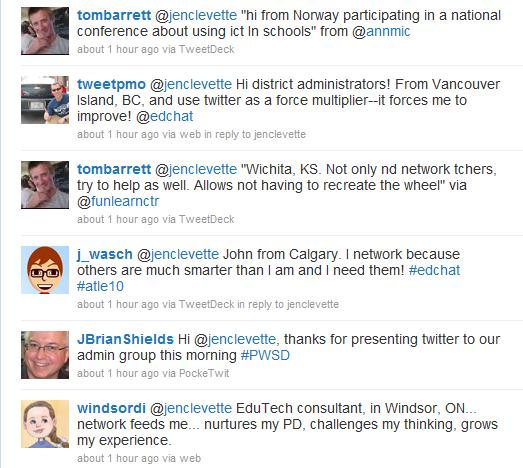
I had a short presentation at our monthly admin meeting this morning where I wanted to show the power of being a connected educator. An hour before I was to start I tweeted out:
2) Sign up for Twitter
3) Download Tweetdeck, it will make your Twitter experience so much better!
4) Find Friends and Hashtags to follow
Might I suggest: #pwsd #abed #edchat and #cpchat
And this list of fine PWSD educators
I have been tweeting for just over a year and know that Twitter is something that makes my job easier, more fulfilling and generally just makes me happy to connect with all these fabulous people. However trying to show that is sometimes difficult, but not today!!
Thanks to my wonderful PLN I think we have a number of administrators that are convinced!
Here is some quick ways to get started:
1) Watch this...Twitter in 60 seconds
2) Sign up for Twitter
3) Download Tweetdeck, it will make your Twitter experience so much better!
4) Find Friends and Hashtags to follow
Might I suggest: #pwsd #abed #edchat and #cpchat
And this list of fine PWSD educators
![]() |
| cc licensed flickr photo shared by The Daring Librarian |
Monday, November 29, 2010
November Administrators Meeting
At this meeting we will be going over the Educational Technology in our district for this year. We will also start working on becoming Connected Principals.
Back Channel: either Tweet wtih #pwsd or join http://todaysmeet.com/novadmin
Digital Storytelling: A Day
For a recent school assignment I had to create a digital story. Being some what creatively challenged I told the story of a day in the life of my job as Educational Technology Coordinator for Peace Wapiti School District. Wanting a bit of a challenged I set out to create the story completely on my iPhone. Here are 3 different versions.
This first story was created using a free application called StoryKit. You can find the story here. What I liked about this application is that I could use capture multiple voices for my story. I could also crop the images right on my phone.
The second story was created using StoryRobe, another free app. What I liked about this is how it rendered as a YouTube video.
The final story was created using PhotoPeach which is a free web application. It is crazy simple to use.
PWSD Educational Technology on PhotoPeach
For a more complete analysis please visit my other blog.
This first story was created using a free application called StoryKit. You can find the story here. What I liked about this application is that I could use capture multiple voices for my story. I could also crop the images right on my phone.
The second story was created using StoryRobe, another free app. What I liked about this is how it rendered as a YouTube video.
The final story was created using PhotoPeach which is a free web application. It is crazy simple to use.
PWSD Educational Technology on PhotoPeach
For a more complete analysis please visit my other blog.
Subscribe to:
Posts (Atom)