Saturday, January 1, 2011

Resolutions (or something like it)

After every winter break I try and do a little something in my classroom to refocus our learning and celebrate returning to school.  Here are some ideas;


What's my sentence?  Daniel Pink


Two questions that can change your life from Daniel Pink on Vimeo.


I used this video to have students craft their sentence for the remainder of the year.  On the front of a 8.5 x 11 piece of paper they create a poster of "Am I better today than yesterday?" then on the back they crafted their sentence.  These were posted around the room with the sentence hidden, to be revisited later in the semester.


Memories of 2010 Craft


Take a look at this cute and simple project.  An easy way to get students to reflect on what has happened so far, pick the top events and refocus on the remainder of the year.  Paper, pencil crayons and paperclips and you are set!


One Word

http://www.gritandglory.com/2010/01/01/one-word-2/
A little easier than crafting a sentence, what is your word going to be for 2011? Create it and post it.


letter S letter h letter A letter R letter E 

Student Goal Setting

There are lots of different ways to do this, I am sure you have one that is tried and true.  Take a look at this one (and subscribe to his blog while you are there, it is awesome).  I love the two readings that go along with this but you will have to modify the goal sheet to meet your needs.   

Project 365/2011: Who is with me?

This time last year I jumped into a 365 photo project.  My New Year's resolution was to find a better work-life balance and this was one of things that I was going to do for me.  However, it turned into so much more. 

If you don't want to go through the 300+ pictures here are a few highlights


365/2010 on PhotoPeach


The Work Photo Collage!


Why do it?

I loved this project because it was a simple way for my family and friends to keep up with what was going on way up north and wonderful way for me to record what we did. It was awesome for July, when we were in Europe, to allow family to see what we were doing. I used Awesome Note on my iPhone to write a diary entry and then emailed it to my 365 blog whenever I found a free wireless connection. It is 20 days of wonderful details about our trip.

I also took some liberty and included video for some of my daily images.  I use this one all the time during presentations on Internet Safety and watch this when I need to have a laugh

It was also a great reminder of all the wonderful things that I did professionally this year.  Organizing and delivering professional development, attending conferences like Digital citizenship symposium, ATA summer conference, ATLE and TEDxEdmonton.  Small glimpses inside my classroom, presentations and the crazy amount of travel that I did the past year.  Gives me some perspective looking back on all that has been accomplished. 


How?

This year I used Posterous because, like their motto says, it's dead simple.  I set up my site and then emailed my photo to the address.  Simple.  It worked perfectly because I could do it from my computer or my phone and after the initial set up, I rarely visited to make site changes. 


This year I am considering moving to Flickr  to join the 365/2011 group  so that I can have a little more motivation to keep up with the picture a day.

New Goals
  1. Higher resolution photos, which means more with my camera and less with my phone
  2. Figure out my camera settings
  3. Use some of the ideas from the Daily Shoot
  4. Find some work-life balance
  5. Have some friends and colleagues join me!
So, who is with me?

Tuesday, December 14, 2010

Literacy: Digital Ways to encourage Writing

Here is a couple of websites that I have seen used successfully this year to motivate and encourage students to write.

I think what has been key this year is giving students an authentic audience to write for.  When you can put your ideas and thoughts out on the Internet and have other people, sometimes strangers, comment on what you did...the feeling is unbelievable! 


Click here for links and details http://sqworl.com/mmwk3r

Thanks to Shelley Friesen for showing me Sqworl, the cool visual bookmarking tool!  Let us know if there is anything we can do to help!

12 days of Educational Technology

On the twelfth day of Christmas my Ed Tech shared with me


Twelve must have items,
Eleven parts of Google,
Ten Video Options,
Nine Ways to Wiki,
Eight Keys to twitter,
Seven Presentation Tools
Six Cartoon Generators
Five Avatar Creators
Four Word Clouds
Three Blogging Tools
Two Sticky Walls
One Creative Commons Search

Please check out the full course http://ecommunity.pwsd76.ab.ca/course/view.php?id=947 (there is a moodle zip if you wish to deploy it in your own moodle)

Wednesday, December 8, 2010

IT/ET Board Meeting Presentation

Some of the files, slideshows, links and videos that we hope to use during the 40 minute presentation.


IT Darcy's handout


Peace Wapiti School Division Facebook Page


PWSD Educational Technology on PhotoPeach


Writing Prompts: 5 Card Flickr

I got this wonderful idea from this presentation, which is part of the Interesting Ways series.


Here is an example of a 5 Card Flickr Story. 


How To

(1) Go to 5 Card Flickr website and start choosing the images that you will write from.  Each time you pick an image the page will refresh with different images.

(2) When you have 5 images selected you will get a dialogue box to type in the title of your story, your name and the story.

(3) Once you have submitted, and your story is now published on the web, you are given the URL of the story.

(4) We then had students add their URL to a forum in Moodle so that they could visit each others stories and add comments!

Comments and Concerns
  • Make sure students use their first name only for publishing
  • Students were initially concerned about online publishing but ended up loving that other people could read their stories
  • Writing for a "real" audience changes how you write, right?
  • Have fun!


Tuesday, November 30, 2010

Connected Educator

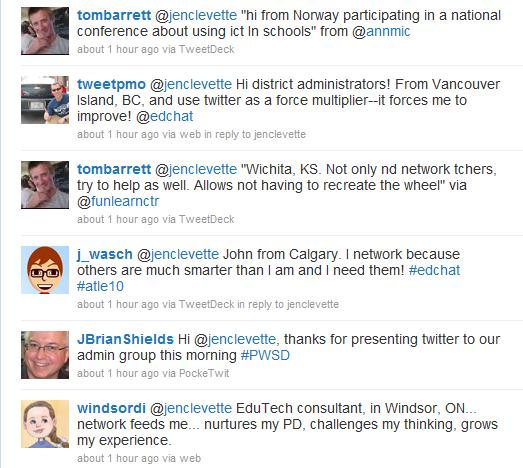
I had a short presentation at our monthly admin meeting this morning where I wanted to show the power of being a connected educator.  An hour before I was to start I tweeted out:
I have been tweeting for just over a year and know that Twitter is something that makes my job easier, more fulfilling and generally just makes me happy to connect with all these fabulous people.  However trying to show that is sometimes difficult, but not today!!


Thanks to my wonderful PLN I think we have a number of administrators that are convinced!

Here is some quick ways to get started:

1) Watch this...Twitter in 60 seconds

2) Sign up for Twitter

3) Download Tweetdeck, it will make your Twitter experience so much better!

4) Find Friends and Hashtags to follow

Might I suggest: #pwsd #abed #edchat and #cpchat
And this list of fine PWSD educators

cc licensed flickr photo shared by The Daring Librarian